
Socially is a dashboard that seamlessly integrates various social media accounts into one platform. Since its launch, it has proven invaluable for social media monitoring missions, offering features that enable users to effectively monitor, analyze, and share data from multiple online sources.
I collaborated with a multidisciplinary team of Product Manager and software engineers to enhance user experiences and develop solutions for this powerful dashboard.
One of Socially's key features is the ability to track real-time comments on social media accounts. However, when users close the dashboard or are away from the comment section, they risk missing these comments. Users have expressed a desire for a tool that notifies them when specific keywords appear in comments, especially when these keywords reach a certain volume, for a specific social media account.
I interviewed with Socially's users to collect key areas for improvement to ensure they can receive relevant alerts and stay informed about important interactions.
Users suggested that the alert system should allow customization for specific keywords and set thresholds for keyword volume.
Users want the alert feature to work across all platform screens, ensuring they receive alerts even when not viewing the comment section on a specific dashboard or while engaged in other tasks.
Users expressed the need for notifications to reach them even when they are not actively monitoring the dashboard, helping them stay responsive and engaged.
Users emphasized the importance of an efficient alert management system to create and organize alerts. This would enable them to handle critical alerts and manage their notifications efficiently.
When evaluating the landscape of monitoring tools, Google Alerts, Dataminr, and Twitter’s keyword block feature provide valuable insights for enhancing our product.
Provides notifications for specific keywords across the web but lacks real-time precision and social media focus. It also lacks an integrated management interface, making alert prioritization and organization challenging.
Offers real-time information discovery from publicly available data, including social media. It is powerful but complex and primarily targets specific markets, making it less accessible for general users.
Enables users to mute specific words but does not offer proactive alerts or cross-platform integration. It focuses on filtering content rather than delivering timely notifications about critical conversations.
To stand out, our product should integrate real-time monitoring, provide a user-friendly solution, and enhance cross-platform notification capabilities. This approach will address the gaps in existing tools and offer a more effective solution for managing social media interactions.
After evaluating user needs and competitors, we identified an opportunity to enhance a dashboard that consolidates multiple social media accounts by incorporating alerts for specific keywords within the comments of a targeted social media account.
Implement an alert system that allows users to set preferred keyword and volume thresholds for each social media account on a dashboard, delivering notifications across all screens and off-platform. Additionally, an integrated alert management interface could help users prioritize and organize these alerts effectively.
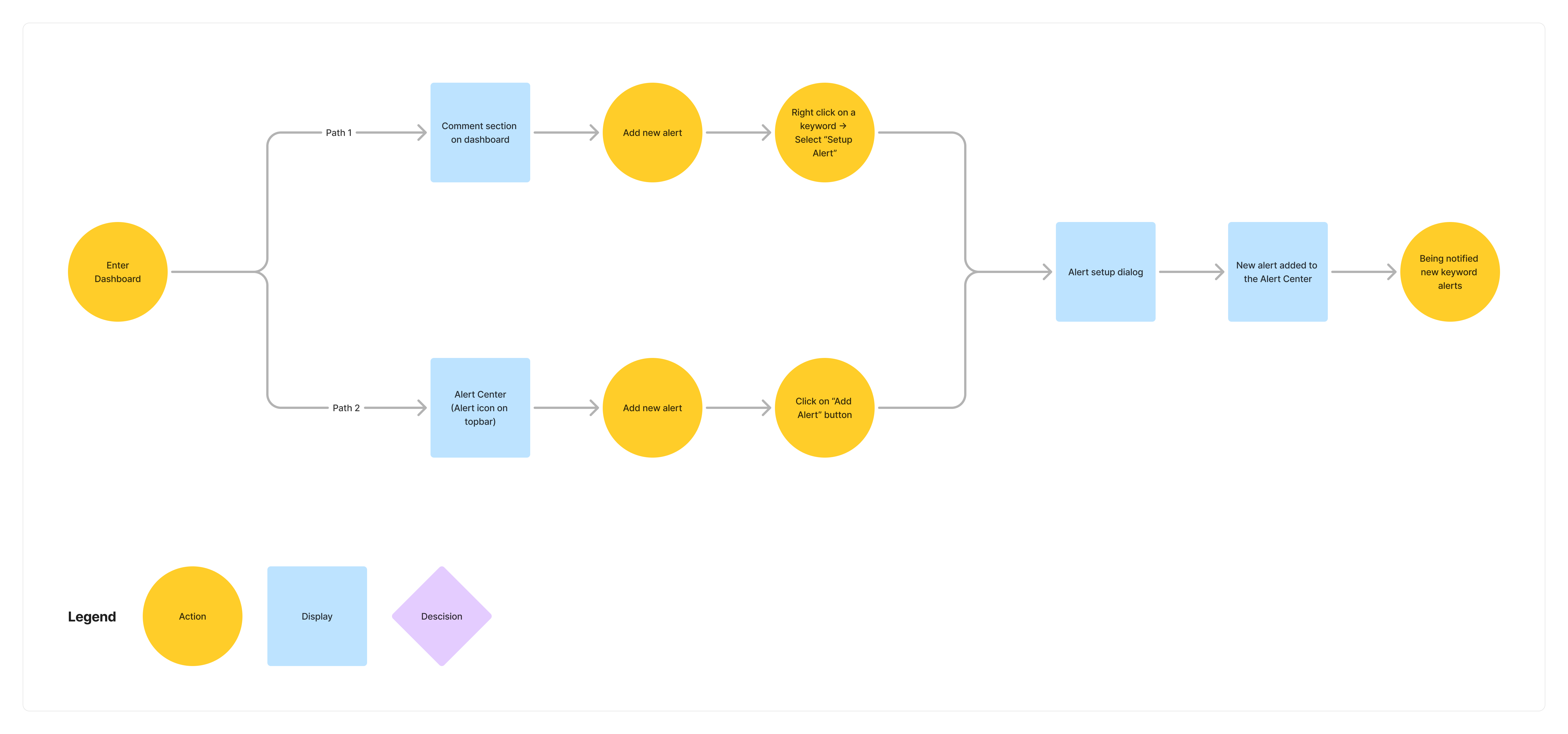
Users can set up new keyword alerts from various paths depending on their tasks. Here’s a user flow illustrating how to create a new alert from different starting points, all converging at the same setup dialog and ending point at the "Alert Center" for a specific social media account.
The Alert Center is designed for creating, modifying, and deleting alerts, offering a centralized system for managing alerts according to users' needs.
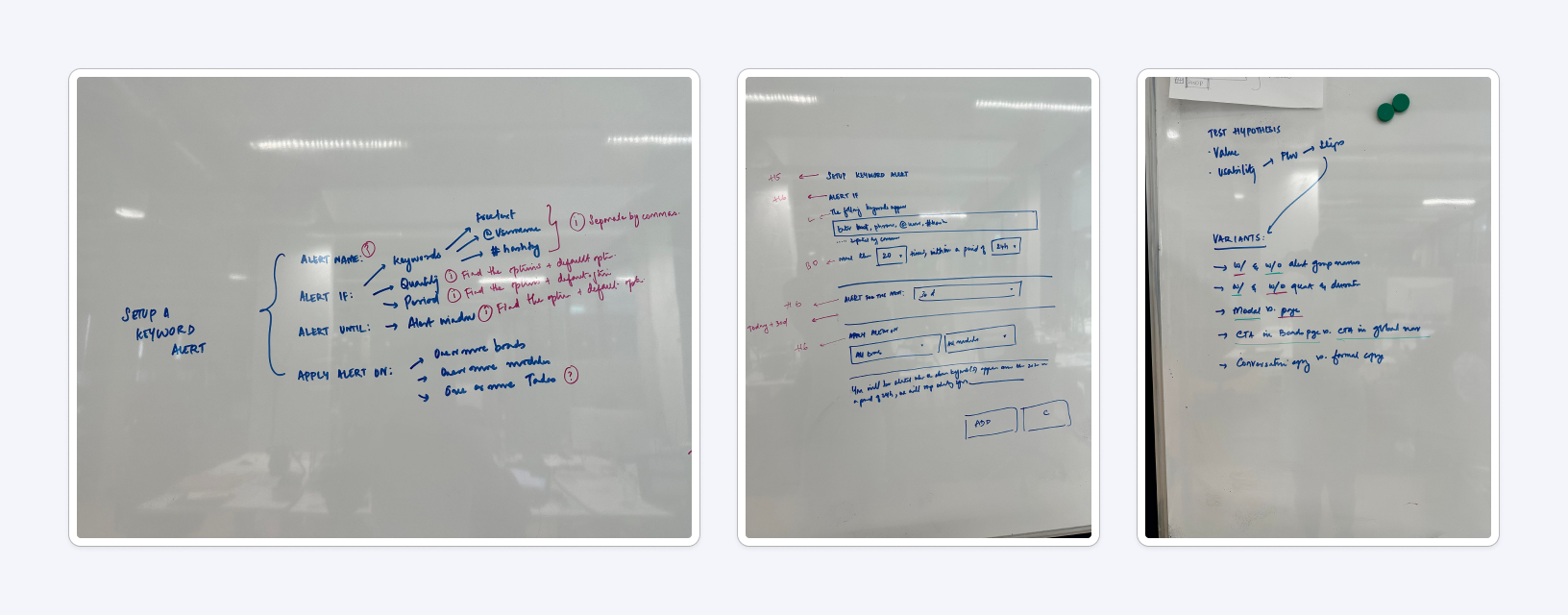
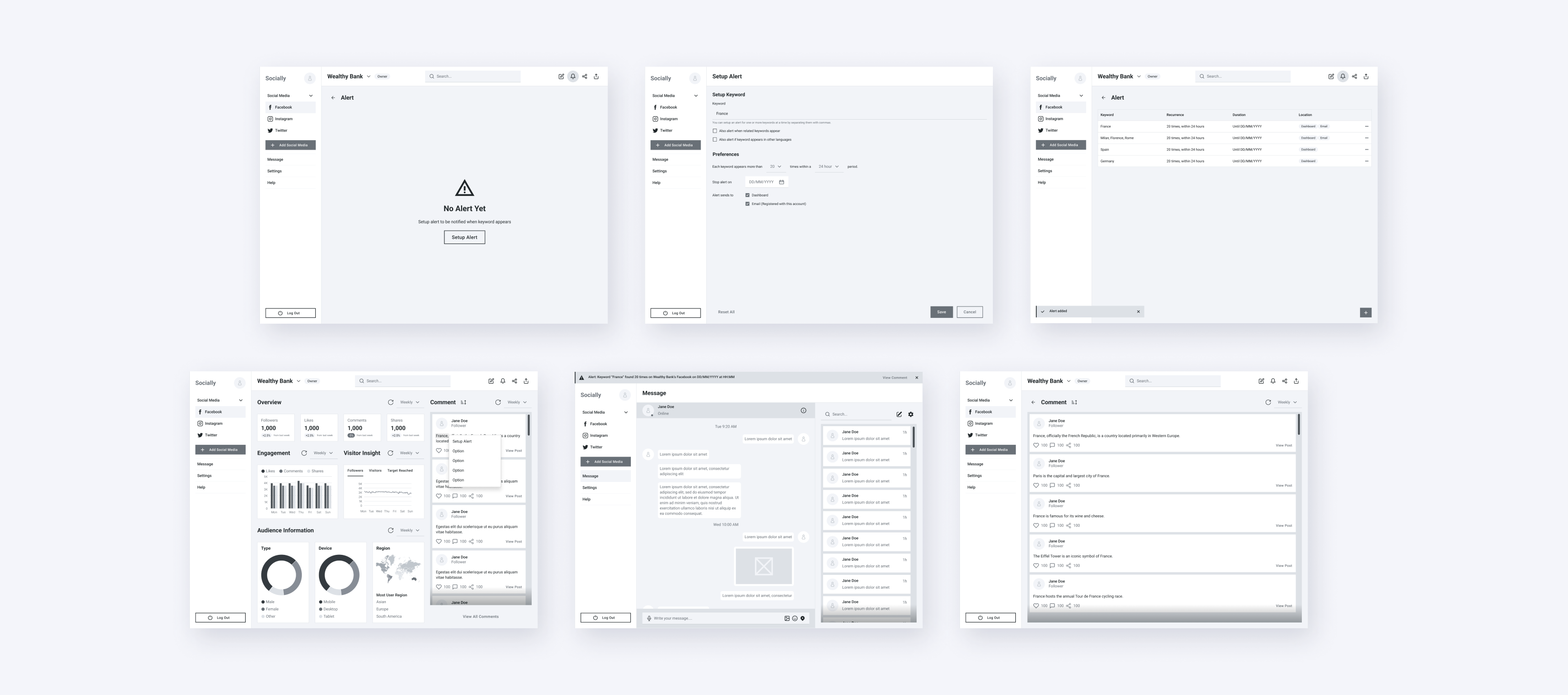
In brainstorming sessions with the Product Manager and guidance from the Senior Product Designer, we exchanged ideas on what to include in the setup dialog, such as, keywords, language agnostics, keyword recurrency, alert ending date etc. We focused on organizing the alert setup process to be logical and user-friendly.
I turned the best proposal from our ideation sessions into low-fidelity wireframes, which were then developed into low-fidelity prototypes.
I prepared and conducted usability testing with Product Manager, using low-fidelity prototypes to evaluate the initial alert concepts and identify any issues. Here are the key improvement points that can help enhance the product.
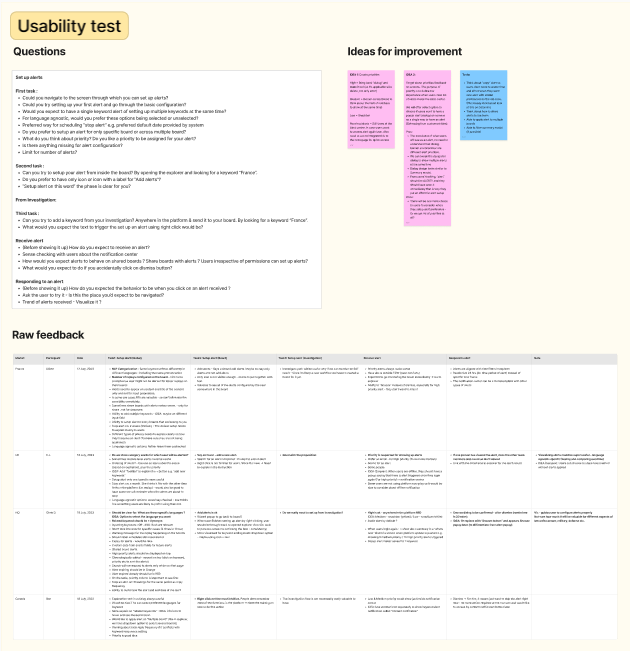
After usability testing and discussions with the Product Manager, we addressed user needs, technical feasibility, and time constraints for the alert feature. Key technical prioritizations include:
This feature is valuable but can be deferred to a future update. Our immediate priority is to launch the core features within the given time constraints, aligning with users' need for a simpler, less complex functionality for their initial experience.
Based on user behavior analysis, we'll prioritize email notifications for now. This approach aligns with our web-based product and offers the most practical solution for offline alerts.
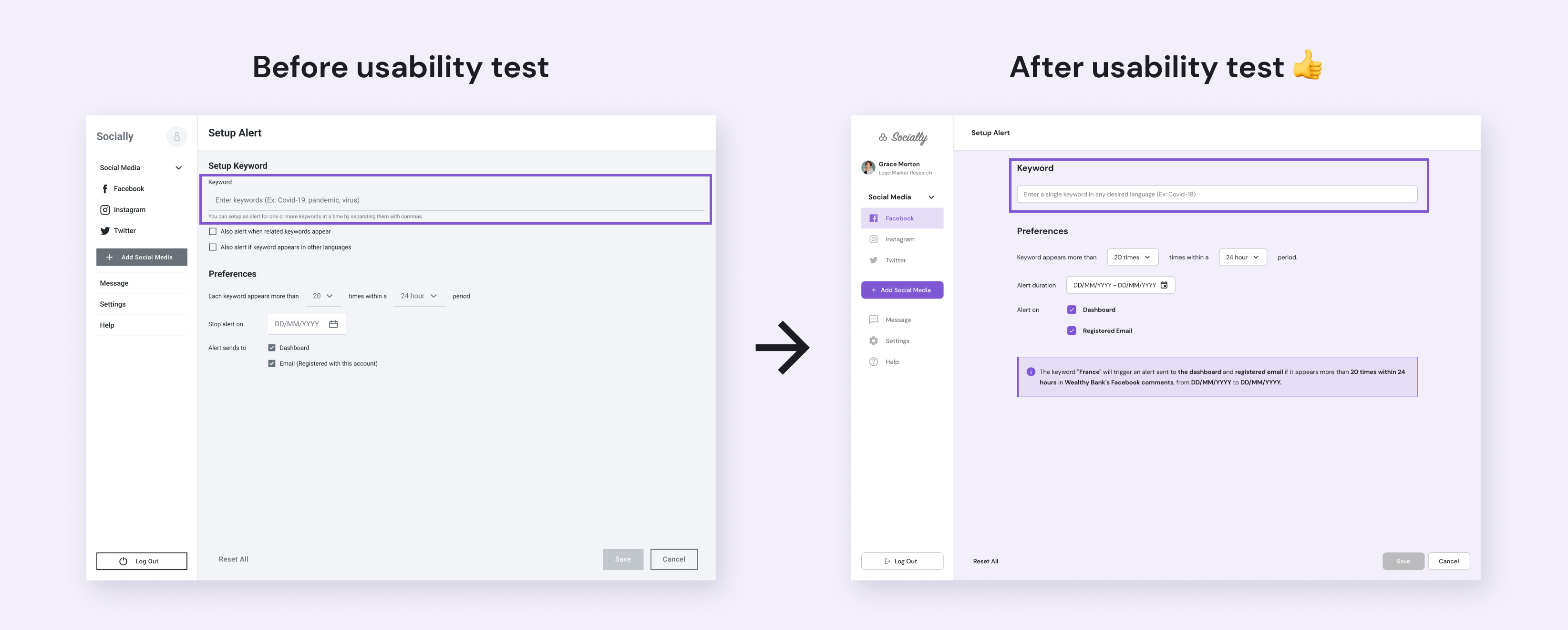
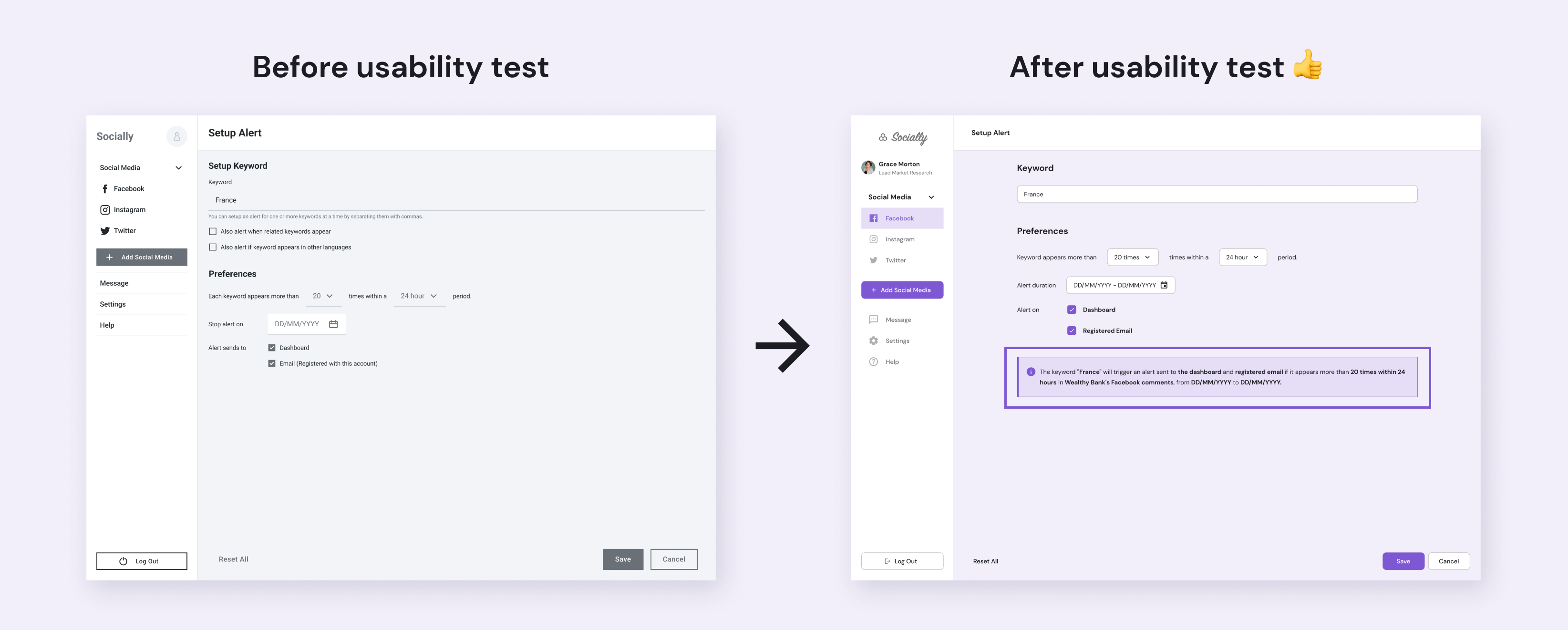
Based on usability testing, here are key changes made to the new alert feature. Firstly, we now allow configuring one keyword per alert, making the setup process easier for users to learn and simplifying technical implementation.
Users can set a start date for alerts, in addition to the end date, enabling them to define when an alert should begin. This allows for a more focused timeframe to track when a targeted keyword appears.
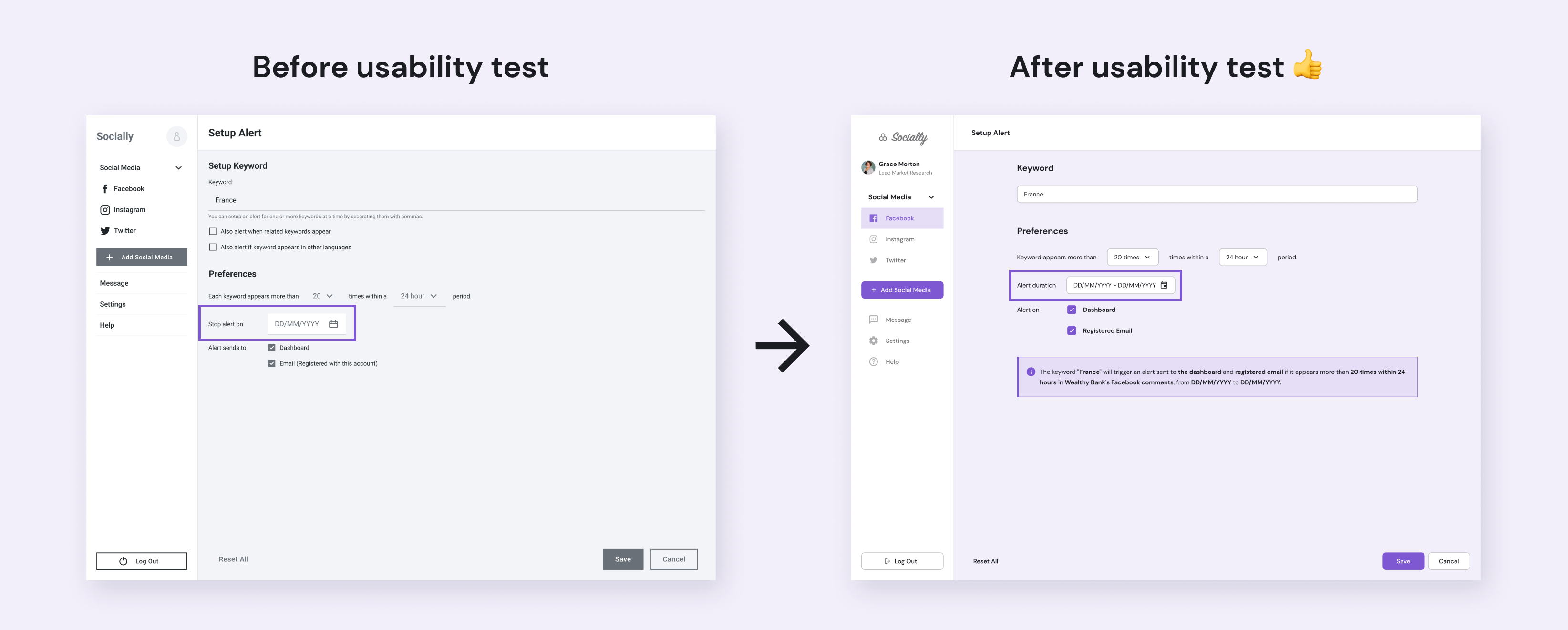
A summary dialog offers a clear overview of the alert setup, detailing the selected keyword, recurrence settings, and notification preferences, enhancing user understanding and management.
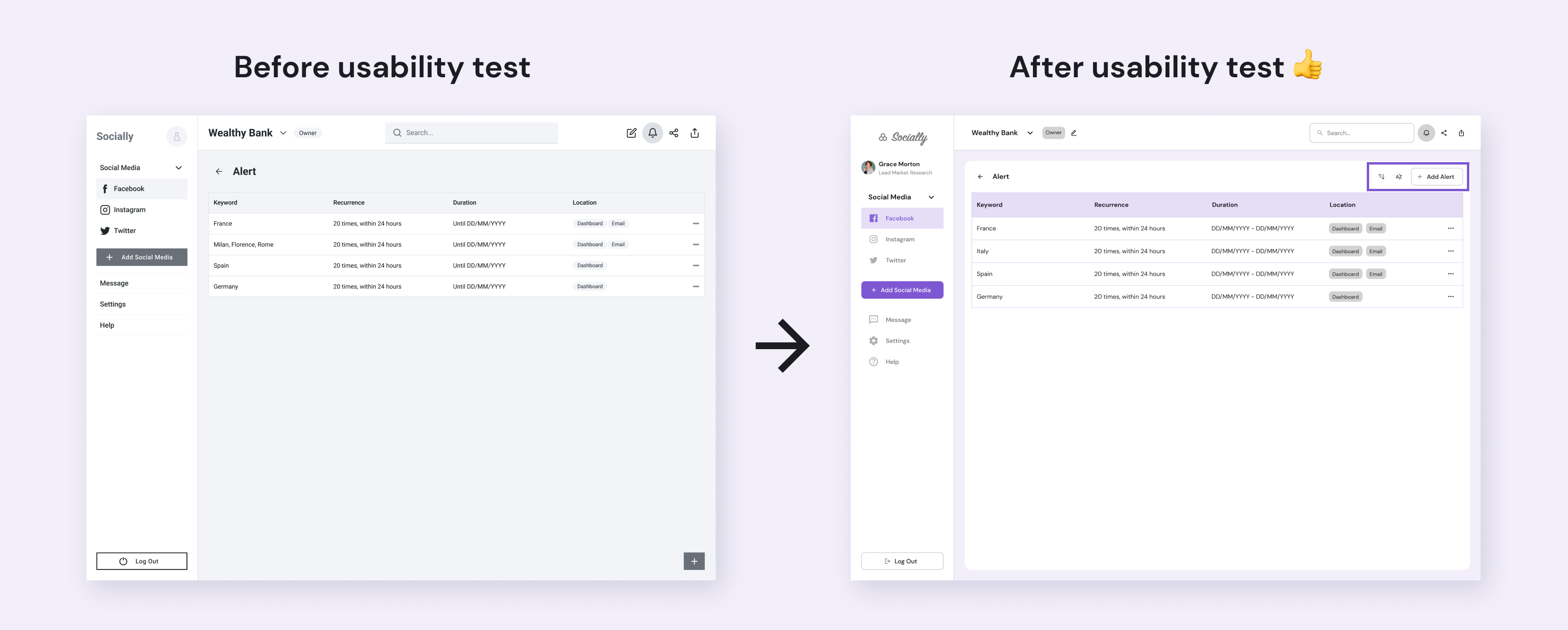
Filtering and sorting options are conveniently located near the "Add Alert" button in the Alert Center, enhancing how users organize and view their alerts for improved navigation and accessibility.
Everything is now seamlessly integrated, ensuring that no important comments will be missed!
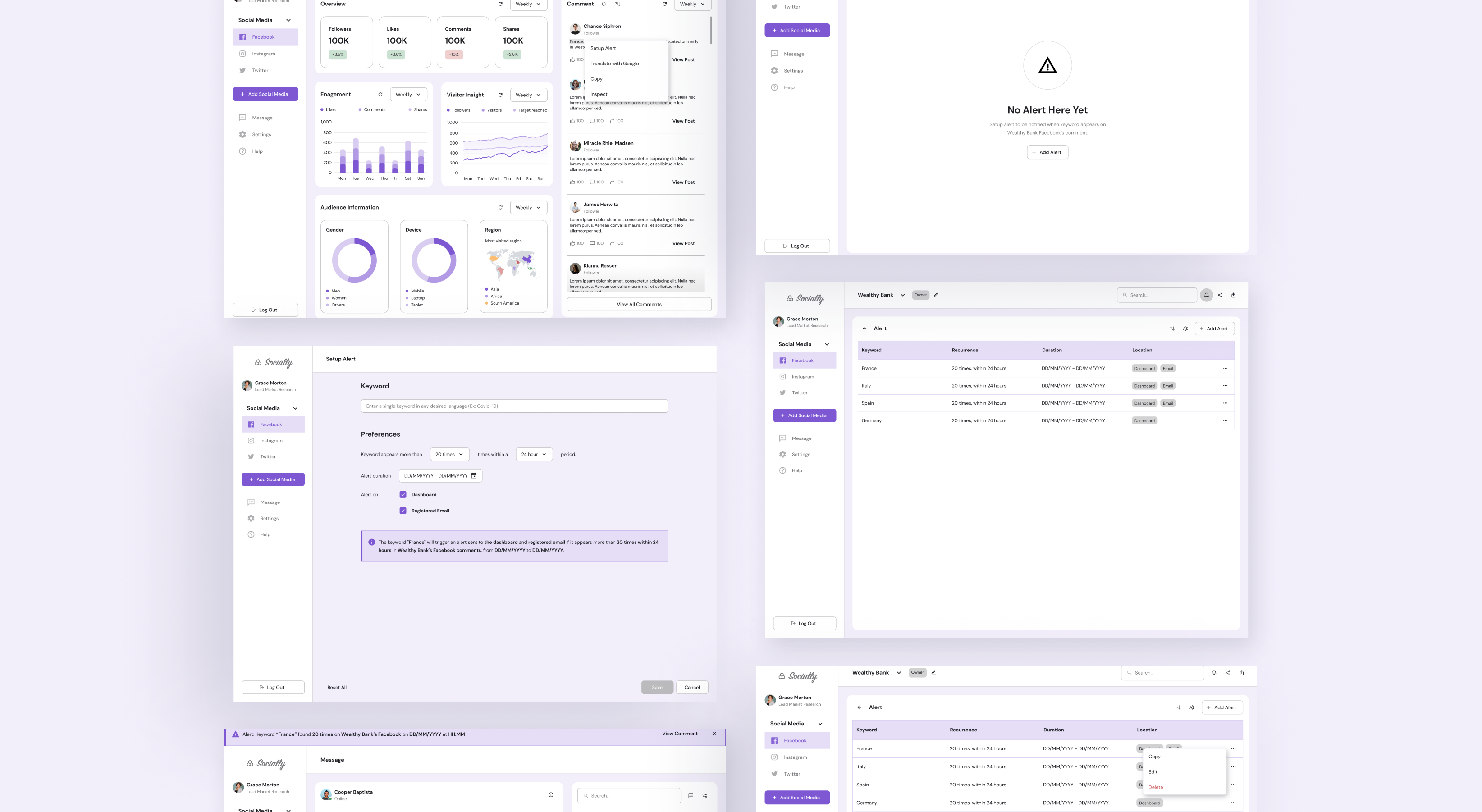
Users can set up alerts by selecting keywords directly from comments on a specific social media account, simplifying the process of monitoring specific terms.
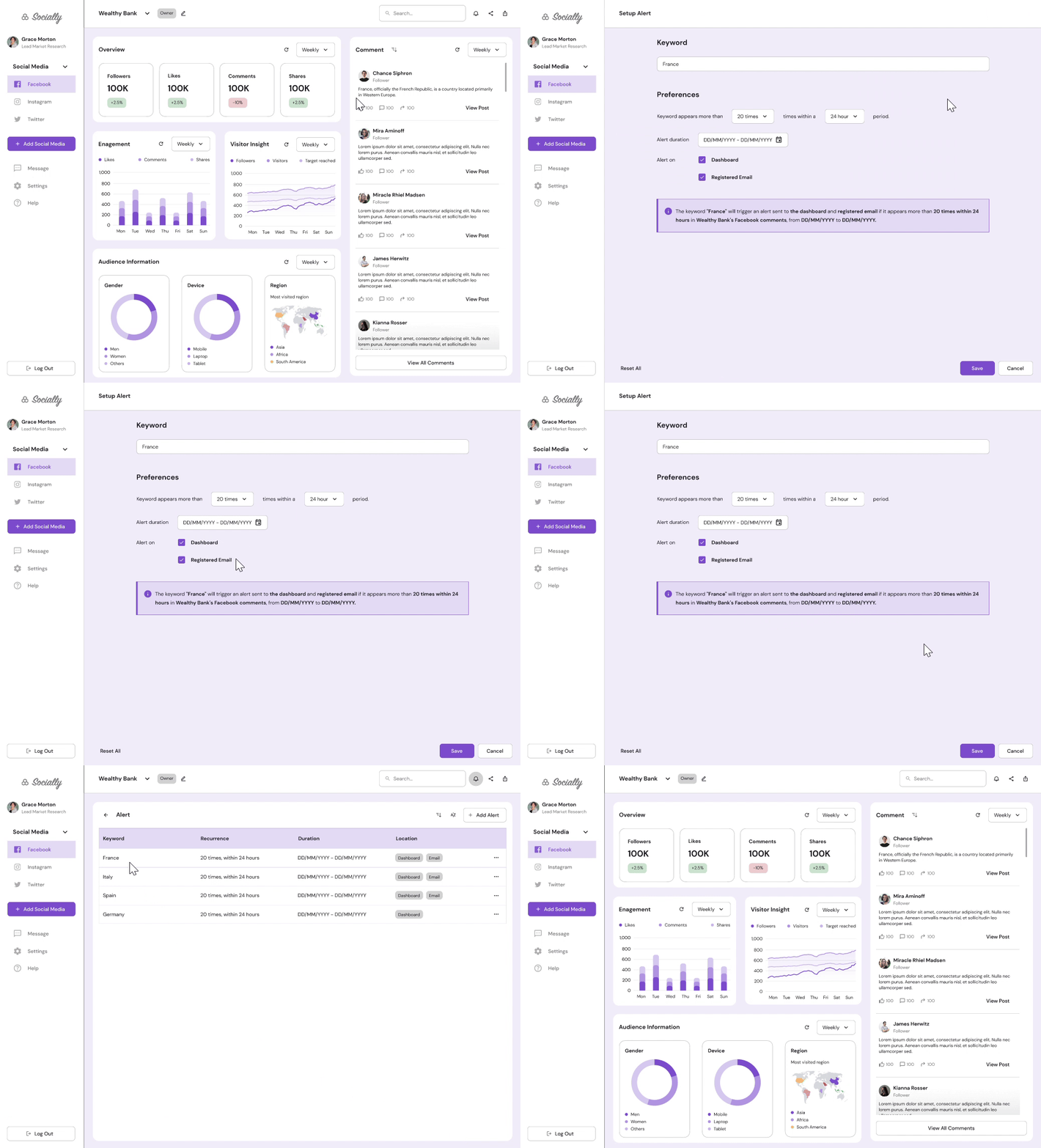
By clicking on the “Alert” icon, users are directed to the Alert Center, where they can easily create a new alert for a specific social media account.
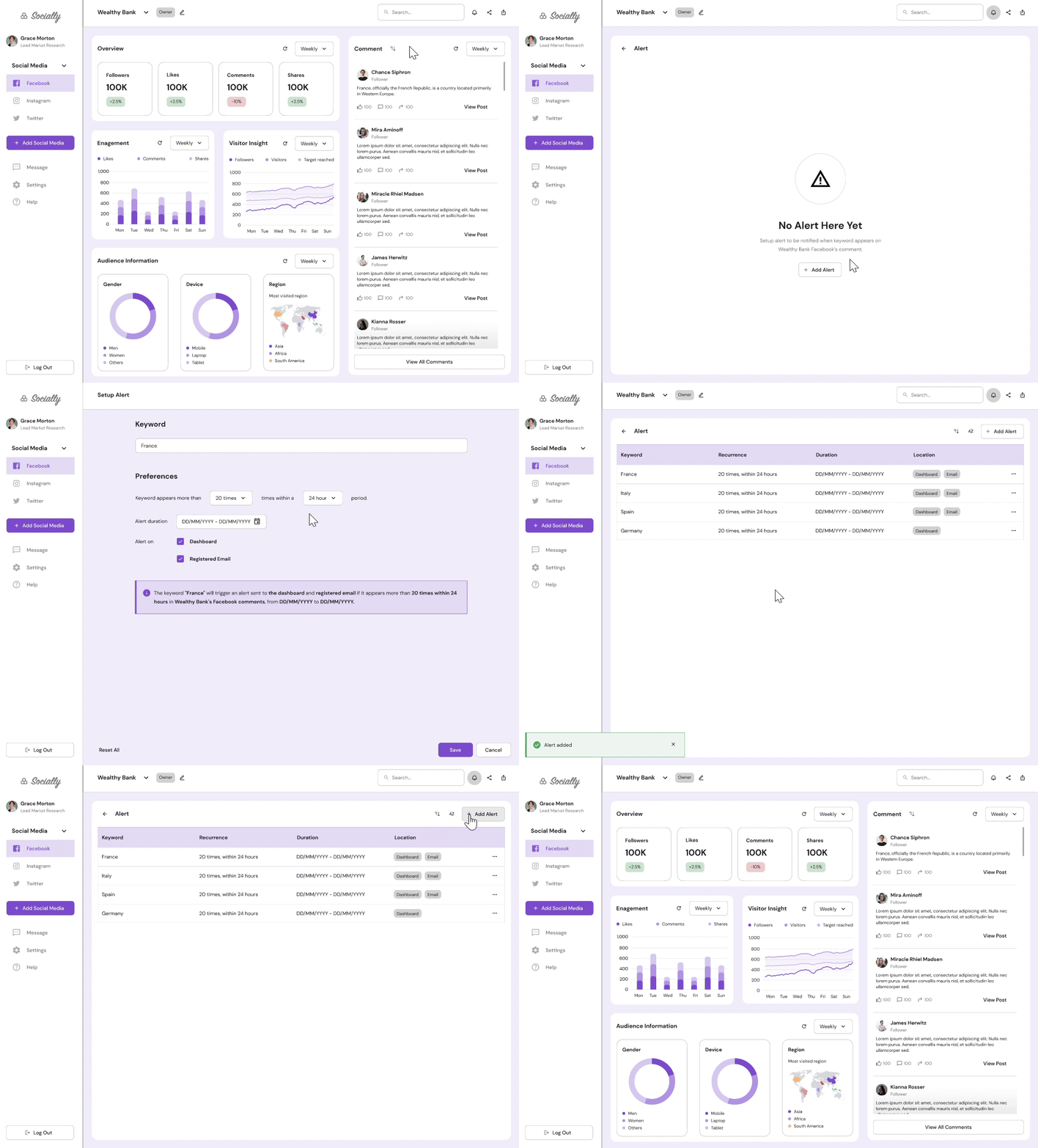
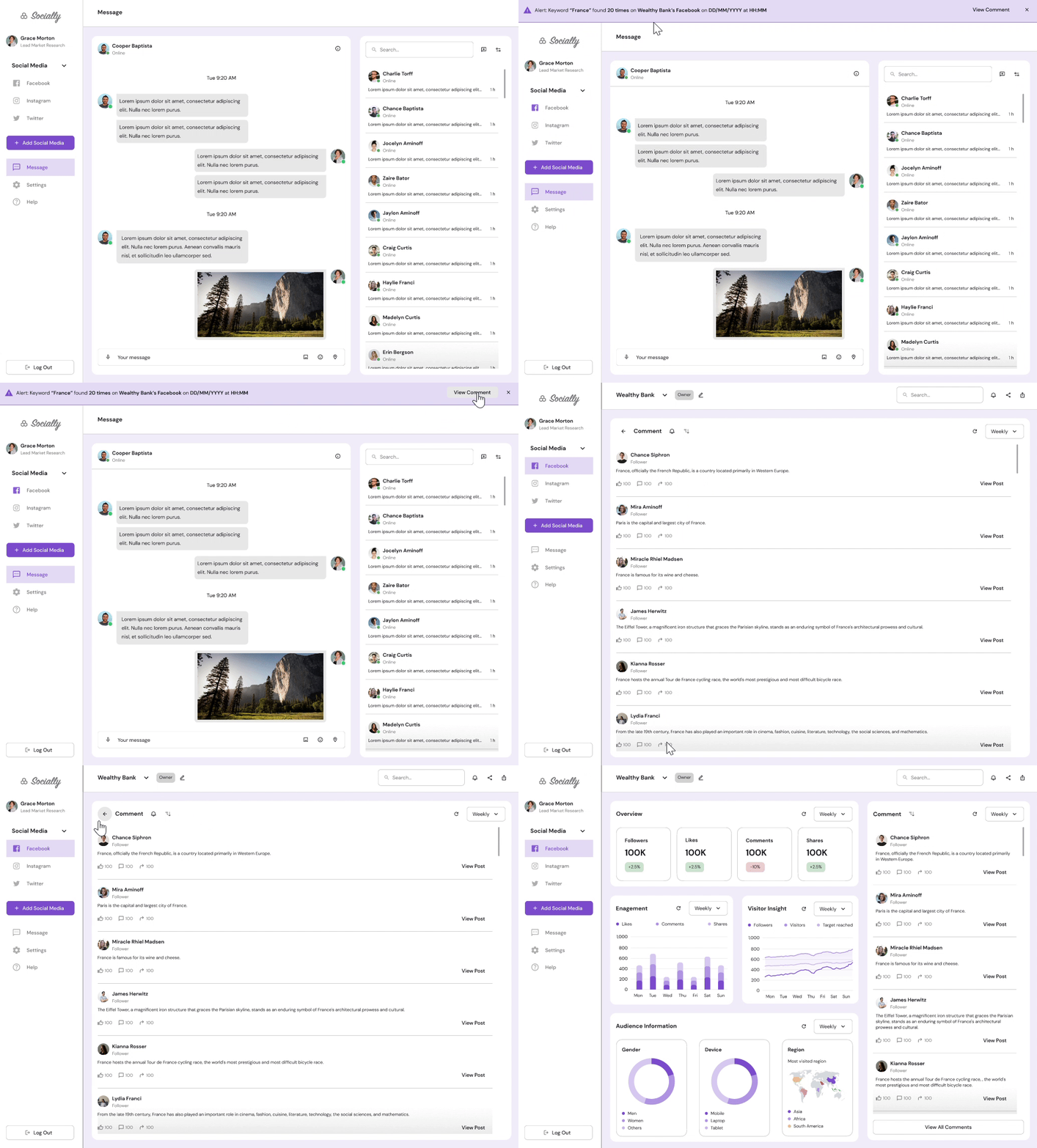
Notifications are displayed as a banner on the dashboard based on configured alerts, allowing users to click and view all related comments.
The Alert Center provides a comprehensive system for managing alerts, including adding, copying, editing, and deleting them.
.png)
Focusing on essential features and addressing technical constraints effectively is crucial for a successful product launch. Prioritizing critical functionalities ensures that core features are delivered on time and meet user expectations.
Keeping the design and functionality simple improves user experience and adoption. An easy approach helps users understand and engage with the product, reducing complexity and potential friction.